
File I/O (Input/Output) is a fundamental concept in programming that allows you to read from and write to files. Optimizing file I/O can greatly enhance the performance of your applications, especially when dealing with large files or high-frequency operations. Golang, with its efficient concurrency model and straightforward syntax, offers several ways to optimize file I/O operations. Here's a closer look at how you can make file I/O operations faster and more efficient in Golang.
1. Use Buffered I/O
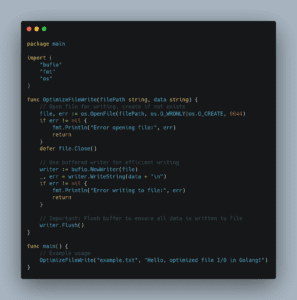
Buffered I/O is a technique that uses a buffer to minimize direct read and write operations to the disk. Golang's bufio package provides this functionality, allowing you to wrap your file objects in a buffered reader or writer. This can significantly speed up I/O operations by reducing the number of system calls. The main function below is an example of its use.
Example:
package main

import (
    "bufio"
    "os"
)

func main() {
    // Open a file for writing
    file, err := os.Create("example.txt")
    if err != nil {
        panic(err)
    }
    defer file.Close()

    // Create a buffered writer from the file
    writer := bufio.NewWriter(file)

    // Write bytes to the buffer
    _, err = writer.WriteString("Hello, Golang!\n")
    if err != nil {
        panic(err)
    }

    // Flush the buffer to write to the file
    writer.Flush()
}
2. Use io.Copy for Large Files
When you need to copy large files, io.Copy is your friend. It's optimized for copying data from one source to another using a fixed-size buffer. This method is efficient because it avoids loading the entire file into memory.
Example:
package main

import (
    "io"
    "os"
)

func main() {
    // Open the source file
    srcFile, err := os.Open("source.txt")
    if err != nil {
        panic(err)
    }
    defer srcFile.Close()

    // Create the destination file
    dstFile, err := os.Create("destination.txt")
    if err != nil {
        panic(err)
    }
    defer dstFile.Close()

    // Copy the contents
    _, err = io.Copy(dstFile, srcFile)
    if err != nil {
        panic(err)
    }
}
3. Work with Memory-Mapped Files
Memory-mapped files can boost performance by mapping a file directly into the virtual memory space of a process. This technique, available through the mmap-go library in Golang, allows you to work with files as if they were large arrays in memory, making read and write operations very fast.
Example:
To use memory-mapped files in Golang, you'll need to import the mmap-go library. Here's a basic example of how to use it:
// Note: First, get the mmap package with: go get github.com/edsrzf/mmap-go

package main

import (
    "github.com/edsrzf/mmap-go"
    "os"
)

func main() {
    // Open file
    file, err := os.OpenFile("example.dat", os.O_RDWR, 0644)
    if err != nil {
        panic(err)
    }
    defer file.Close()

    // Memory-map the file
    mmappedData, err := mmap.Map(file, mmap.RDWR, 0)
    if err != nil {
        panic(err)
    }
    defer mmappedData.Unmap()

    // Work with the file data directly
    mmappedData[0] = 'J' // Example: modify the first byte
}
4. Concurrent I/O Operations
Golang's concurrency model makes it simple to perform I/O operations in parallel. By using goroutines and channels, you can process parts of a file concurrently, which is especially beneficial for CPU-bound I/O tasks.
Example:
package main

import (
    "fmt"
    "sync"
)

func main() {
    var wg sync.WaitGroup
    dataChunks := []string{"Chunk 1", "Chunk 2", "Chunk 3"}

    for _, chunk := range dataChunks {
        wg.Add(1)
        go func(chunk string) {
            defer wg.Done()
            // Simulate an I/O operation
            fmt.Println("Processing", chunk)
        }(chunk)
    }

    wg.Wait()
}
Conclusion
Optimizing file I/O in Golang involves a combination of using buffered I/O, leveraging io.Copy for large file operations, utilizing memory-mapped files for efficient data access, and harnessing the power of Golang's concurrency model for parallel I/O operations. By applying these techniques, you can significantly improve the performance of your Golang applications that rely heavily on file I/O operations. Remember, the choice of technique depends on the specific requirements and context of your application.